You’ve probably built something brilliant with Copilot Studio. A workflow that saves your team hours. An agent that actually understands your business rules. Real, measurable value.
But here’s the problem nobody talks about: once you’ve built it, what comes next? Managing servers. Worrying about security patches. Creating new governance frameworks. Dealing with infrastructure costs that weren’t in the original estimate.
That’s where Microsoft’s new Copilot Managed Runtime comes in. And it’s not just another feature—it fundamentally changes how you can build AI applications without breaking IT governance.
What’s Actually Changed
Microsoft is moving from “build it yourself” to “we’ll manage it for you.”
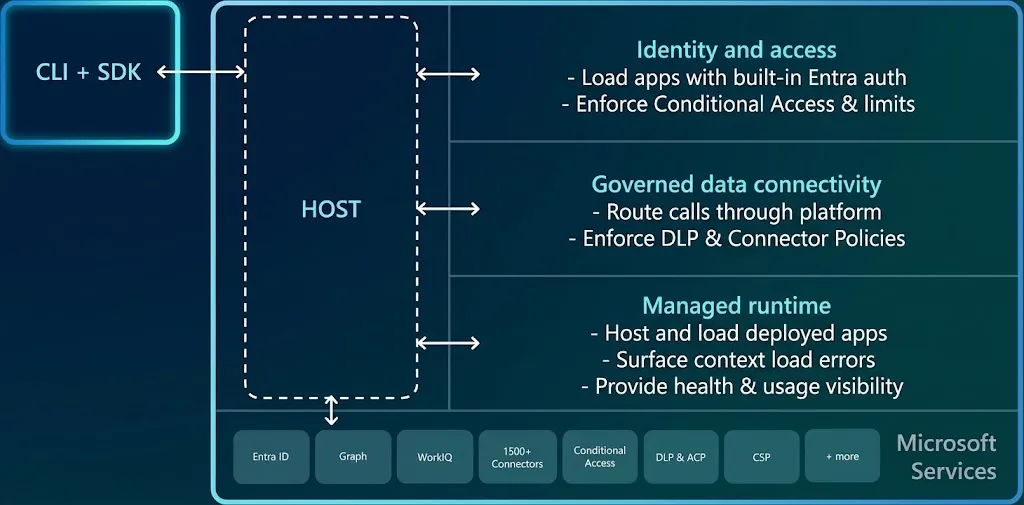
When you create an app with Copilot Studio, Copilot Code, or any compatible SDK, those applications now run on Microsoft’s managed infrastructure. No provisioning. No separate hosting setup. No infrastructure team learning another platform.
But here’s the bit that matters for IT leaders: it all lives within your Microsoft 365 tenant boundary. Your data stays yours. Your security policies apply automatically.
The Real Benefits (Not the Marketing Ones)
1. Governance That Actually Works
Most organisations end up with a messy situation: apps built in Power Apps follow one set of rules, Copilot apps follow another, and nobody knows which systems are connected to what.
With Copilot Managed Runtime, you manage everything through the same place—Microsoft 365 admin centre. One policy framework. One connector approval process. One audit trail.
As one IT director put it: “We can finally see what’s been built and who’s using it.”
2. Your Development Team Can Actually Build Faster
Developers hate infrastructure conversations. They want to write code, not manage deployment pipelines.
The Copilot Managed Runtime uses Git-based workflows. Your team commits their TypeScript code. It deploys automatically. No clicking through cloud dashboards. No separate DevOps process.
This means your developers stop waiting and start shipping.
3. Security That Doesn’t Require a New Framework
You’ve already built Microsoft Entra identity policies. You’ve already configured your conditional access rules. You’ve already decided who can access what data in Dataverse.
The Copilot Managed Runtime uses exactly that same security model. You don’t create a new identity system. You don’t maintain separate credential stores. The authentication and authorisation you’ve already built applies to your AI apps.
IT teams typically spend 3-4 weeks just sorting out authentication and authorisation for new platforms. This saves you that entire conversation.
4. You Get Visibility Into What’s Actually Running
Earlier this year, we helped a financial services firm audit their Power Platform estate and discovered they had no idea how many Copilot applications were active.
With the Copilot Managed Runtime, you can:
- See every deployed app in one inventory
- Check who’s accessing what
- Monitor performance and usage patterns
- Disable apps that no longer match compliance requirements
- Apply organisational policies to specific applications
It’s basic stuff, but you’d be surprised how many enterprises can’t do this today.
The Technical Side (If You Care)
The runtime creates a standardised, enterprise-grade execution environment. Apps generated from Copilot Studio, built with Copilot Code, or created via third-party SDKs all run on the same foundation.
That means:
- Apps get automatic versioning tied to your Git repository
- Rollback is built-in—revert to any previous version in seconds
- Source control integration means you can audit exactly what changed and who changed it
- TypeScript-generated services for all connectors means developers can use their preferred tools
For technical leads, this is genuinely useful. You’re not locked into a specific IDE or deployment tool.
What This Means for Your Roadmap
If you’ve been hesitant about Copilot Studio because of governance concerns: This removes that blocker.
If your development team keeps asking for better deployment workflows: This actually gives them that.
If you’re tired of maintaining multiple identity systems for different platforms: This simplifies that.
If you need to show the board that AI investments are controlled and auditable: This provides that transparency.
The platform entered public preview recently, which means it’s ready to test now. For most organisations, here’s what a realistic timeline looks like:
- Weeks 1-2: Evaluate whether it meets your governance and security requirements. Spoiler: it probably does.
- Weeks 3-4: Move one small pilot application to the new runtime and test it with a real team.
- Week 5+: Roll out to broader teams as you gain confidence.
Most organisations we’ve worked with go from “what is this?” to “this is how we build our AI apps” in about 6 weeks.
Here’s the Honest Take
This isn’t a silver bullet. You still need to think about:
- Who in your organisation can use Copilot to build applications
- What data those applications can access
- How you’re going to manage the apps that get created
But what it does solve is the infrastructure and governance headache that stops most enterprises from properly embracing Copilot.
If you’ve been thinking about Copilot applications but were worried about governance, security, or how to actually manage them at scale, the Copilot Managed Runtime is worth a closer look.
Want to explore this for your organisation? We can help you evaluate whether the Copilot Managed Runtime is right for you and plan a realistic implementation approach that fits your governance requirements.
