
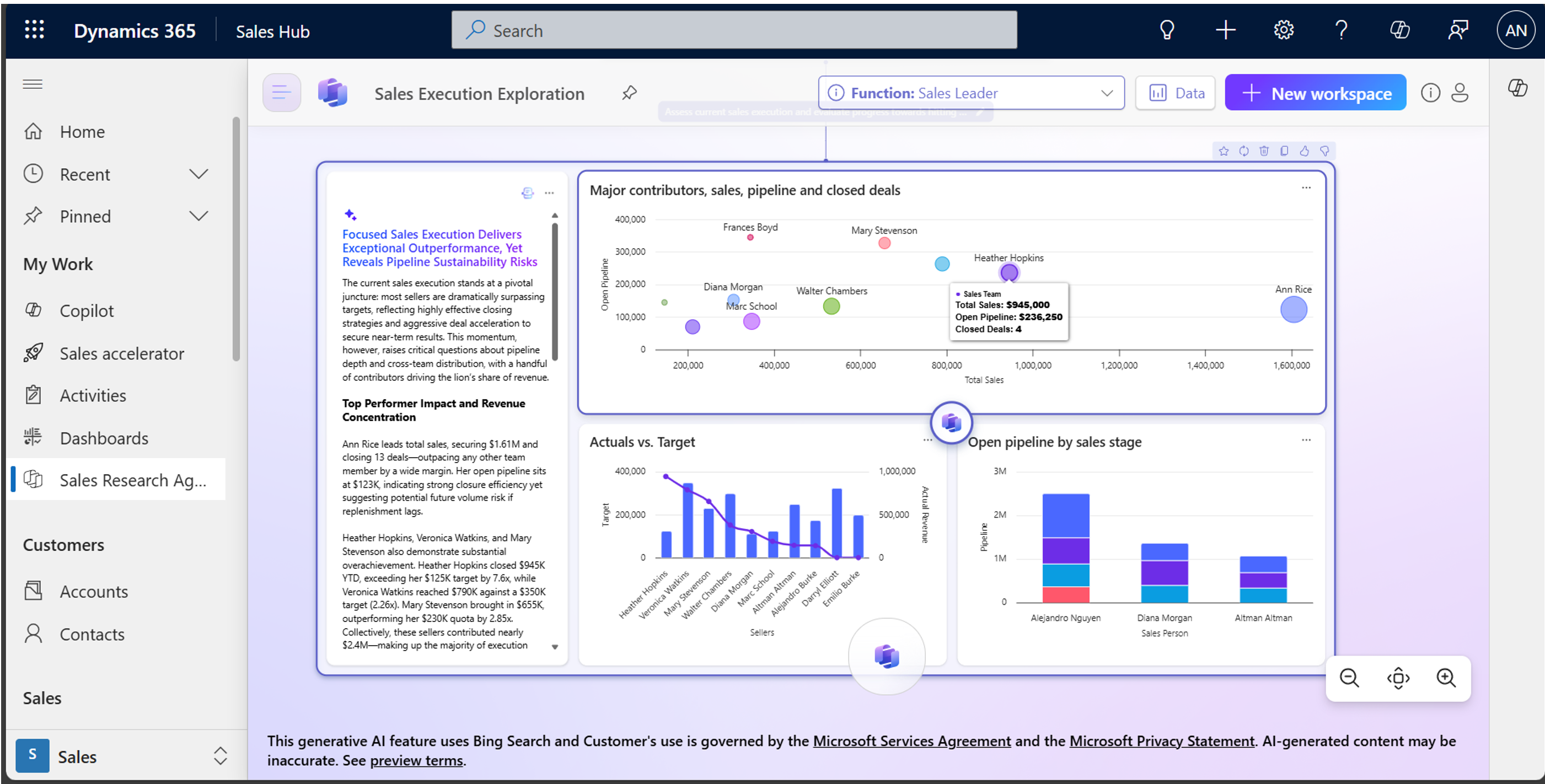
Dynamics 365 Sales Research Agent: Get Answers Without Writing Reports
You ask your sales operations manager: “Which sales reps are at risk of missing quota this quarter?”
Today, they disappear for 2 hours.
They export data from Dynamics 365. They build a spreadsheet. They analyze pipeline velocity. They cross-reference quota data.
They come back with: “Reps 3, 7, and 11 are behind based on current pipeline. Here’s the analysis…”
Then you ask: “What’s different about rep 7’s pipeline compared to rep 3?”
They start building another spreadsheet.
What if you could just ask?
“Which reps are at risk of missing quota? Why? What deals should we focus on?”
And get the answer in 30 seconds with visualizations, data context, and recommendations?
That’s what Sales Research Agent does.
What Is Sales Research Agent?
Sales Research Agent is an AI-powered research assistant built into Dynamics 365 Sales (Premium and higher).
You ask it complex business questions in plain English. It:
- Accesses all your Dynamics 365 Sales data
- Analyzes it intelligently
- Creates visualizations
- Provides insights and recommendations
- Lets you ask follow-up questions
It’s like having a data analyst who works instantly, never gets tired, and explains their work.
What It Actually Does (Real Examples)
Question 1: Pipeline Velocity Analysis
You ask: “Why did pipeline stall in Q2? Which products/regions were affected?”
The agent responds:
- Total pipeline started Q2 at £4.2M
- By end of Q2, £2.8M (67% of Q1 levels)
- Visualization showing pipeline by region
- Shows which product categories dropped most
- Identifies that “Enterprise software” pipeline was down 40%
- Drilling into details shows: 5 large deals were pushed to Q3 due to [specific reason]
Time to answer: 30 seconds (vs. 2 hours building a spreadsheet)
Follow-up question: “Of those 5 deals, which ones are at highest risk of being lost?”
Agent responds immediately with risk factors for each deal, probability assessment, and suggested actions.
Question 2: Salesperson Performance Comparison
You ask: “How are this year’s new hires performing compared to veterans in the same territory?”
The agent responds:
- New hire average deal value: £52K (veteran average: £67K, -22%)
- New hire win rate: 28% (veteran: 42%, -33%)
- New hire average sales cycle: 4.2 months (veteran: 3.1 months)
- But: New hire pipeline is strongest in account base quality (higher contract values)
- Recommendation: “New hire is slower but targeting higher-value accounts. Coaching on sales cycle acceleration would improve conversion.”
Time to answer: 20 seconds (vs. building multiple comparison reports)
Question 3: Customer Churn Risk
You ask: “Which customers are likely to churn in the next 90 days?”
The agent responds:
- Analyzes customer engagement (last contact, opportunity frequency)
- Identifies patterns of at-risk accounts
- Lists 23 accounts with churn risk >60%
- Shows pattern: Accounts with no new opportunity in 6+ months have 73% churn risk
- Recommendation: “Prioritize outreach to 12 accounts in top half of risk, 6 of which just completed renewal.”
Time to answer: 15 seconds
Follow-up: “Which of these are my top revenue accounts?”
Agent immediately re-prioritizes the list showing revenue impact.
How It Works (The Workflow)
Step 1: Connect Your Data
Default: Connects to your Dynamics 365 Sales data automatically (opportunities, accounts, leads, activities, pipelines).
Optional: Connect additional data sources:
- Excel files (forecast data, territory definitions)
- CSV files (customer intelligence, external market data)
- PDF documents (customer proposals, contracts)
- Microsoft Fabric Lakehouse (advanced analytics from other systems)
- Other Dataverse environments (multi-tenant organizations)
Step 2: Ask a Question
Using starter prompts:
- “What’s driving our pipeline?”
- “Which deals should I prioritize?”
- “Which territories are underperforming?”
- “What’s our forecast accuracy?”
Or ask in natural language:
- “Why did Q2 revenue miss quota?”
- “Which reps would benefit from coaching on X?”
- “Which customers have increased deal velocity?”
Step 3: Agent Responds
Agent generates a “research blueprint” that includes:
- Research summary – High-level findings
- Data visualizations – Charts, tables, trend graphs
- Key findings – Specific insights answering your question
- Suggested next steps – Recommended actions based on data
Step 4: Refine and Explore
Follow-up questions trigger instant re-analysis:
- “Show me only deals over £100K”
- “Compare Q2 to Q1”
- “Which of these are at risk?”
- “How does this compare to our competitors?”
The agent adapts its analysis to your follow-up questions without starting over.
Step 5: Export and Share
Export findings as:
- PDF report (for stakeholders)
- Excel spreadsheet (for further analysis)
- Teams message (share directly)
- PowerPoint presentation (for board meetings)
Real ROI (What It Actually Saves)
Time Savings
Scenario: Sales operations manager, £100M business, monthly reporting
Current state (without agent):
- Query Dynamics 365 data: 15 mins
- Export and clean: 20 mins
- Build visualizations: 30 mins
- Write summary: 30 mins
- Create recommendations: 20 mins
- Total: 115 minutes per report
With Sales Research Agent:
- Ask question in natural language: 2 mins
- Review agent response: 5 mins
- Refine based on follow-up questions: 5 mins
- Export as report: 3 mins
- Total: 15 minutes per report
Time saved: 100 minutes per report × 12 reports/year = 1,200 hours per year
Cost: 1,200 hours × £35/hour (operations salary) = £42,000/year saved
Decision Speed
Example: “Which deals should we prioritize for Q3?”
Current approach:
- Sales ops builds pipeline report: 2 hours
- Sales manager reviews: 1 hour
- Back-and-forth on specifics: 1 hour
- Total: 4 hours elapsed, decision made 1 day later
With Sales Research Agent:
- Ask agent: 2 minutes
- Get instant insights on deal risk, probability, timing: 3 minutes
- Sales manager makes decision: 5 minutes
- Total: 10 minutes elapsed, decision made immediately
Business impact: Faster decisions = faster action = better deal outcomes
Better Decision Making
Without agent: Decisions based on gut feel or incomplete data (“I think rep X is struggling”).
With agent: Data-driven decisions (“Rep X’s pipeline is 30% below average for the territory, and average deal cycle is 40% longer than peers, suggesting they need coaching on discovery or qualification”).
Impact: Better coaching, higher close rates, fewer surprises at end of quarter.
When Sales Research Agent Makes Sense
✅ Use It If:
- Your sales operations team spends >5 hours/week building reports and analysis
- You need quick answers to complex questions (pipeline health, forecast accuracy, rep performance)
- Your business is £20M+ revenue (where data-driven decisions have big impact)
- You want to identify coaching opportunities through data
- You need to understand trends and patterns in your sales data
⚠️ Lower Value If:
- Your sales operations team is very small or doesn’t exist
- You don’t use Dynamics 365 (agent only works with your D365 data)
- Your sales process is simple/transactional
- You don’t have time to act on insights the agent provides
Implementation Requirements
Technical Setup
Licensing: Dynamics 365 Sales Premium or higher (£135/user/month)
Prerequisites:
- Clean Dynamics 365 Sales data (agent works best with accurate, complete records)
- Users trained on what questions to ask
- Defined business context (to help agent understand your business)
Time to enable: 1-2 hours (admin activation in Power Platform admin center)
Data Preparation
The agent works best when:
- Opportunity data is complete (win/loss indicators, amounts, stages)
- Sales cycle data is consistent (dates are accurate)
- Account data is clean (no duplicates, complete information)
- Custom fields are documented (agent understands your data model)
If data quality is poor: Garbage in, garbage out. Clean data first.
Change Management
Getting adoption:
- Identify “power users” (sales ops, senior managers)
- Train them on types of questions the agent can answer
- Build templates for common questions
- Share results across team to create awareness
- Expand to broader user base
Common resistance:
- “I don’t know what to ask” – Start with templates, build confidence
- “This is replacing me” – Explain it’s replacing manual analysis, not the operations role
- “Data isn’t trustworthy” – Use agent to validate data quality, then improve it
Common Use Cases (What Works)
Sales Operations
- Pipeline health monitoring
- Quota attainment forecasting
- Rep performance benchmarking
- Territory analysis
- Compensation calculations
Sales Leadership
- Quarter planning (“Which deals should we prioritize?”)
- Risk identification (“Which reps need support?”)
- Opportunity analysis (“Why did this deal stall?”)
- Strategic planning (“What’s our addressable market trajectory?”)
Sales Coaching
- Performance gaps (“How does this rep compare to top performer?”)
- Training needs (“What skills does this team need coaching on?”)
- Account strategy (“Where should we focus with this customer?”)
Forecasting
- Pipeline conversion rate analysis
- Win/loss analysis
- Seasonal pattern identification
- Prediction of missed quarters
Common Limitations (What It Doesn’t Do)
-
It only works with data you have. If your customer intelligence data isn’t in Dynamics 365, the agent can’t see it (unless you upload Excel/CSV files).
-
It requires clean data. If your pipeline data is inconsistent, results will be inconsistent.
-
It can’t replace business judgment. Agent identifies patterns. You interpret them.
-
It’s not real-time. There may be a slight delay (seconds to minutes) while the agent processes large datasets.
-
It requires context. The better you define your business context (what “at risk” means, how you define territories), the better the insights.
Sample Prompts (Try These First)
Pipeline Analysis:
- “What’s driving our pipeline this quarter?”
- “Which opportunities are at highest risk?”
- “How does our pipeline compare to this time last year?”
Performance:
- “Who are our top performers? What do they do differently?”
- “Which reps need coaching on objection handling?”
- “How are our new reps performing?”
Forecasting:
- “Will we hit quota this quarter?”
- “What’s our probability of closing the pipeline?”
- “Which regions are performing above/below forecast?”
Strategy:
- “Which products/markets should we invest in?”
- “Where’s our biggest opportunity?”
- “Which customer segments are growing?”
Efficiency:
- “Which deals should we prioritize?”
- “Where are we losing deals?”
- “How can we improve our sales cycle?”
Your Implementation Timeline
Week 1: Assessment
- Review data quality in Dynamics 365
- Identify key business questions to solve
- Plan data preparation
Week 2: Setup
- Enable Sales Research Agent (technical setup)
- Define business context for your organization
- Identify power users
Week 3: Training
- Train power users on asking questions
- Create templates for common questions
- Build sample analyses
Week 4+: Adoption
- Monitor usage
- Gather feedback
- Expand to broader audience
- Continuously refine business context
Your Next Steps
Sales Research Agent is one of the most powerful AI features in Dynamics 365 because it democratizes data analysis. Instead of “wait for the operations team to build a report,” anyone can ask a question and get an answer instantly.
Before you implement:
- Assess your data quality – Is your Dynamics 365 data clean and complete?
- Identify key business questions – What would you ask if you could get instant answers?
- Plan change management – How will you get adoption from leadership and sales teams?
- Consider context – What business context would help the agent provide better insights?
Ready to get instant answers from your sales data?
Book a discovery session where we’ll assess your data quality, identify key business questions, and create a 30-day implementation plan. Most organizations see immediate value through faster decision-making and better visibility into pipeline health.
Or explore Dynamics 365 Sales Copilot features to understand all the AI capabilities available.
